Fundamentals · 5 min read · DJ Trainr
How to use DJ Trainr step by step
You've uploaded your set to DJ Trainr and got a report full of data. Now what? This guide explains what you're looking at in each section and how to use it to actually improve.
Upload your set and choose a profile
Go to djtrainr.com, drag your recording (MP3, WAV, AIFF, FLAC, OGG or M4A) and choose a session profile. If you're not sure which one fits best, leave it on Standard. In a few minutes you'll have your report.
Your score and the first thing to fix
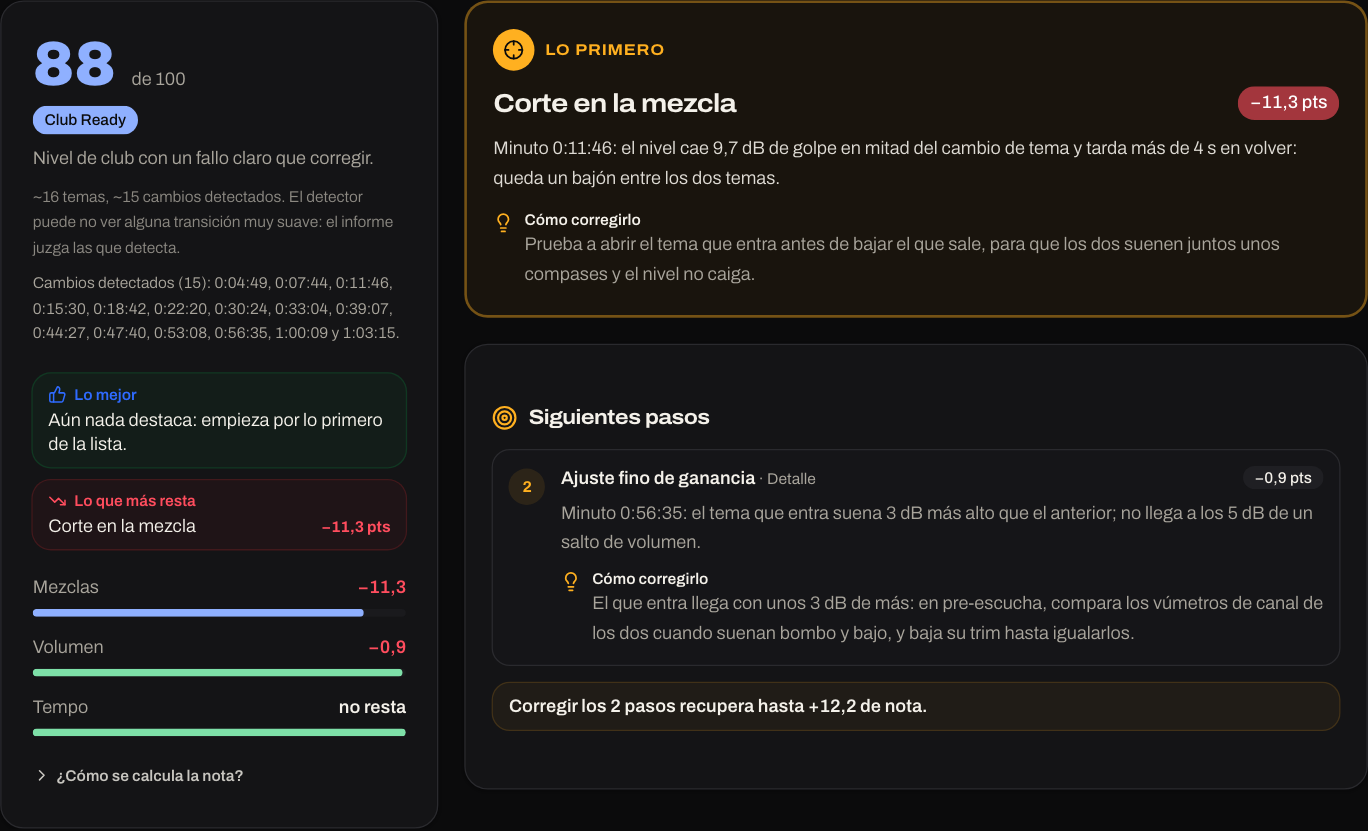
The first thing you see is your score from 0 to 100 and your level: Disaster, Beginner, In progress, Club Ready or Headliner. The score is 100 minus what the mistakes the analysis measures and confirms take away: gaps between tracks, dips or level bumps in the mix, volume jumps, stacked bass, tempo jumps or kicks out of sync. Next to it is "Start here": the mistake that costs the most, the minute it happens and how to fix it. Anything that can't be confirmed from the recording is listed separately for you to listen to, and costs nothing.
Each section and your mixes, one by one
Below you have the sections of the set (mixes, volume, tempo and journey), each with what was measured and what costs points. In "Your mixes, one by one" every track change appears with its level, its volume, its tempo and whether the kicks are in sync. And "To practise" gives you a concrete exercise for what costs the most. This is what tells you what to practise.
The set map
The set map draws the whole set by bands (lows, mids and highs), with every transition numbered, the phases (warm-up, build, peak and cool-down) and a triangle on each mistake. You can zoom into any minute and, with DJ Pro, tap the map to listen to that mix or that mistake. Below, the BPM line shows whether the tempo holds or jumps.
For academies: how it works step by step
If you're a teacher or run a DJ school, DJ Trainr has a complete system for managing your students. Here's how it works:
1. Create your academy: go to djtrainr.com/escuelas, sign up, and name your school. Choose a plan (Starter or Pro) and you'll have immediate access.
2. Invite your students: in your teacher dashboard you'll see a unique invite link. Copy it and send it to your students via WhatsApp, email, or wherever you prefer. They just need to click, sign up, and they're in your academy.
3. Your students analyse their sets: each student uploads their recordings from their own account and gets their full report (score, mistakes with their minute, set map, achievements). They can see their own progress.
4. You see everything from your dashboard: your teacher dashboard shows all your students with their latest score, trend (improving or declining), number of analyses, and date of last set. At a glance you know who's doing well and who needs attention.
5. Drill into each student: click any student and you'll see their average score, best score, trend, and the complete history of all their analyses with date, duration, average BPM, mistakes and achievements. You can open any report to see it in full.
6. Customise your academy: from settings you can upload your school's logo, add a description, and website. Your students will see your branding when they enter their academy dashboard.
The result: you arrive to class knowing exactly what each student needs to work on without listening to every set in full. Objective, data-driven feedback, without wasting hours.
Achievements, progress and the improvement loop
Every set you analyse can unlock achievements (silky hands, steady tempo, architect…) and your score is compared with previous ones to see if you're improving. The key is to repeat: record, analyse, listen to the flagged moments, practice, and record again. Over time you'll see the score go up and the mistakes go down.
Want to put these tips into practice?
Upload your set to DJ Trainr and get a report with your score, every mistake with its minute and what to practise.
Analyze my setSee a sample report